
IELTS preparation features

IELTS Preparation Software Features for Smarter Practice

IntelliPrep combines computer-based Academic and General Training practice, mock tests, Speaking practice, personalised study guidance, mistake review and in-test tools in one connected preparation platform.

Student Portal

IELTS Practice, Mock Tests, Review and Planning in One Workspace

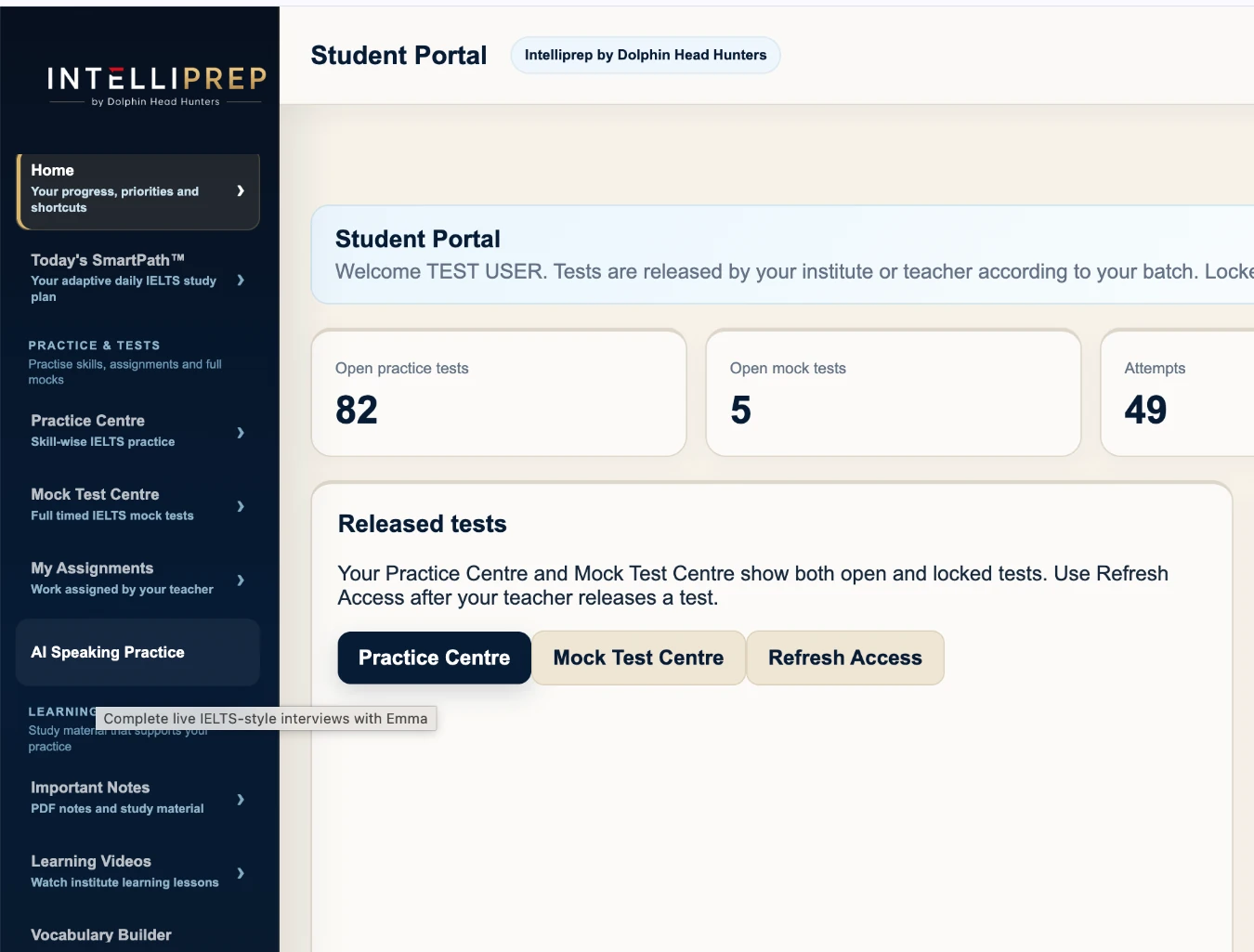
The Student Portal brings focused practice, full mocks, Writing feedback, Speaking practice and progress tools together so the learner always has a clear next step.

  • Practice Centre for targeted work
  • Mock Test Centre for timed performance
  • AI Speaking Practice available from the main learner menu
  • Attempt history and latest feedback remain visible
IntelliPrep student dashboard with Practice Centre, Mock Test Centre, Speaking Practice and feedback
IntelliPrep Student Portal
Personalised support

Speaking practice, IELTS guidance and daily planning — each with a clear purpose.

Emma supports structured Speaking practice. Ask IntelliPrep AI helps with IELTS questions and personalised guidance. SmartPath turns performance into a practical daily study direction.

Emma · Speaking

Emma AI Speaking Practice

Emma takes the learner through IELTS Speaking Parts 1, 2 and 3. Recognised answers remain visible before confirmation, short or empty responses can be retried, and feedback is separated from the final practice estimate. The result is a practice aid, not an official examiner score.
Ask Intelliprep AI

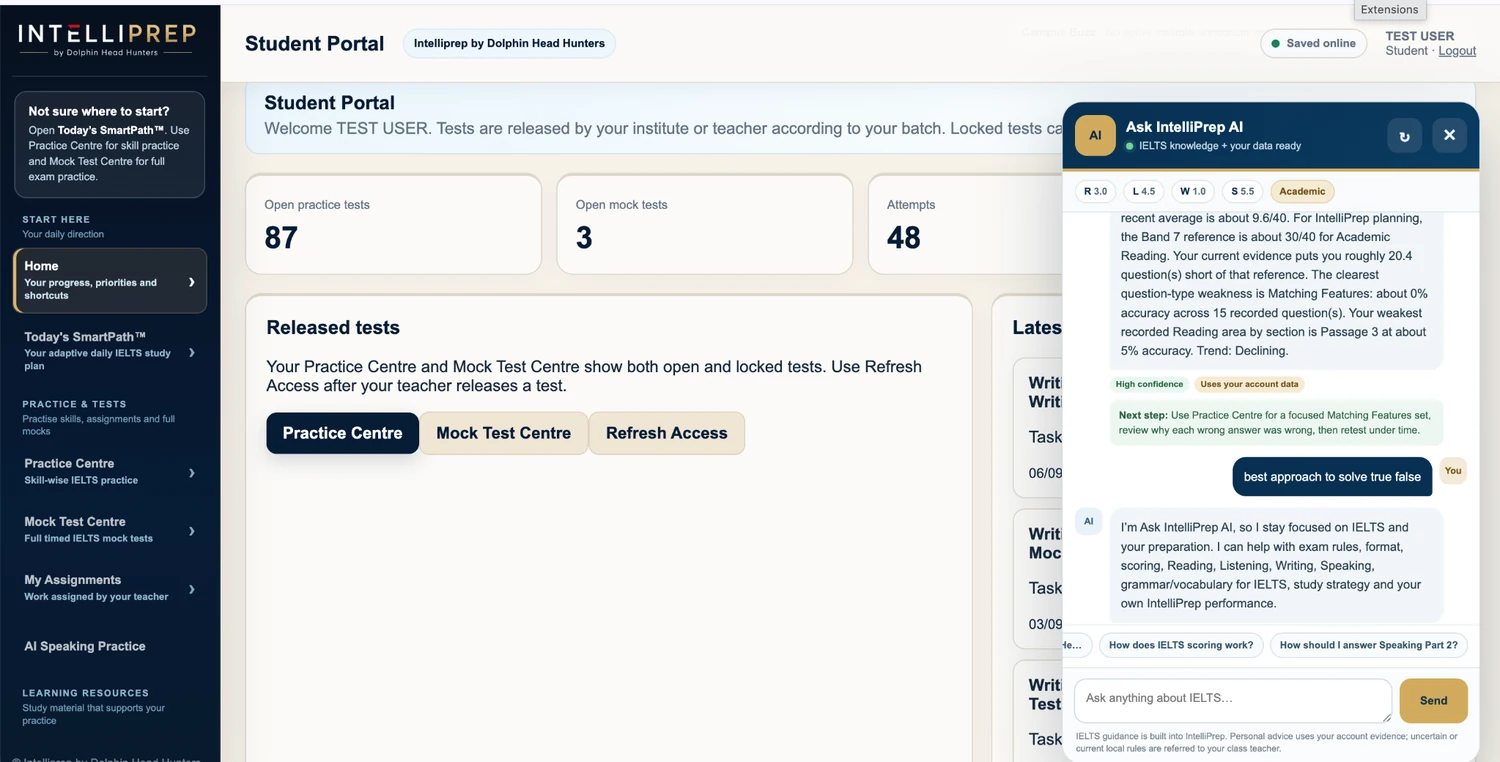
IELTS guidance + your data

Students can ask natural questions about IELTS strategy, scoring, Reading, Listening, Writing, Speaking and study planning. When the question is personal, it can use the learner’s own recent performance to make the guidance more relevant.

SmartPath

A daily plan from real evidence

SmartPath uses recent attempts, weak question types, mistake patterns and unfinished priorities to decide what deserves attention next. The goal is focused practice rather than simply completing more tests.

Ask Intelliprep AI showing personalised IELTS Reading guidance using learner performance evidence
Ask Intelliprep AI · personalised IELTS guidance inside the Student Portal
Ask IntelliPrep AI

Get IELTS guidance without digging through menus.

Students can ask questions in normal language about IELTS strategy, scoring, study planning and their own performance. Where reliable learner evidence exists, IntelliPrep can use it to make the guidance more relevant.

  • IELTS knowledge across all four skills and study planning
  • Student-performance context for personal questions where evidence exists
  • Clarification instead of confident guessing when wording is genuinely ambiguous
  • Active-test answer-key safeguards remain in place
Mistake review

Turn every mistake into targeted practice.

Move from an incorrect answer to explanation, related practice and recurring-pattern tracking instead of simply checking the answer key.

Explanation

Why I Got It Wrong

Review the reason an answer failed so the student can identify the clue, rule or solving habit that needs to change.

Remedial practice

Similar Questions

Practise related questions immediately after the explanation so the corrected method is applied rather than merely read.

Patterns

Mistake Bank

Keep recurring mistakes visible so repeated weaknesses are not hidden by one overall percentage or one improved mock.

Readiness

Band Readiness

Compare current preparation evidence with the target and use the signal to decide whether to keep repairing weaknesses or move toward full mocks.

Reading + Listening tools

Take notes and work through questions without clutter.

The test interface keeps useful tools close at hand while protecting the space needed for passages, questions and answer controls.

01

Docked Notepad

Open a right-side notes panel that makes space for itself rather than covering the question area. Notes can be searched, edited and revisited across the test.

02

Red note markers

Text carrying a note is clearly marked in the passage or question area so the learner can see what has been annotated.

03

Copy · Highlight · Note

The in-test selection tools stay deliberately simple, so highlighting and notes remain useful without adding clutter to Reading practice.

04

Cleaner Reading workspace

Passage and question panes remain independently usable with a minimal resize handle, screen-friendly styling and task-specific controls.

Academic + General Training

Practise the correct IELTS format for your test route.

Academic and General Training are kept distinct where the exam demands it. Focused practice and timed mock tests are also kept separate because they solve different learning problems.

Listening

Part-aware computer practice

Work through completion, MCQ, matching and visual tasks with timed progression, review and question-type performance tracking.

Explore IELTS Listening Practice →
Reading

Academic + GT passage work

Practise the major IELTS Reading question families with passage tools, notes, highlighting and connected review.

Explore IELTS Reading Practice →
Writing

Academic + GT task practice

Keep Writing tasks and submission history in the same preparation system, with trainer evaluation where the selected plan includes it.

Explore IELTS Writing Practice →
For IELTS institutes

Give students a simple experience while your team keeps academic control.

Institute accounts add student, teacher and administrator roles, batches, assignments, controlled test access, Writing review, resources, announcements, student-directory tools and performance reporting.

Explore institute features
AssignFull tests or focused practice
ControlRelease tests by student or batch
ReviewWriting, results and progress
OrganiseStudent directory, batches and resources

Want to compare access options?

See self-study, trainer-supported and institute pricing.

View pricing
IELTS software FAQs

Questions about IntelliPrep features.

Clear answers about how the main preparation tools fit together.

What does IntelliPrep include for IELTS preparation?

IntelliPrep combines Academic and General Training practice, full mock tests, Emma AI Speaking Practice, SmartPath, Band Readiness, mistake analysis, analytics and institute workflows.

What is the difference between Practice Centre and Mock Test Centre?

Practice Centre is for focused skill and question-type improvement. Mock Test Centre is for full timed exam-condition practice.

What is Why I Got It Wrong?

Why I Got It Wrong helps the learner review the likely reason an answer failed so the mistake can become a reusable solving lesson rather than only an answer-key check.

What are Similar Questions?

Similar Questions provide immediate related practice after mistake review so the learner can apply the corrected method while the original error is still fresh.

What is Band Readiness?

Band Readiness is a preparation signal built from available practice evidence. It is not an official IELTS score.

Can institutes use the same IntelliPrep platform?

Yes. Institute workflows include student, teacher and administrator roles, batches, assignments, controlled access, Writing review, resources and performance reporting.

4.9/5
Rated by 4,947 studentsFeedback from students who used or tested IntelliPrep.